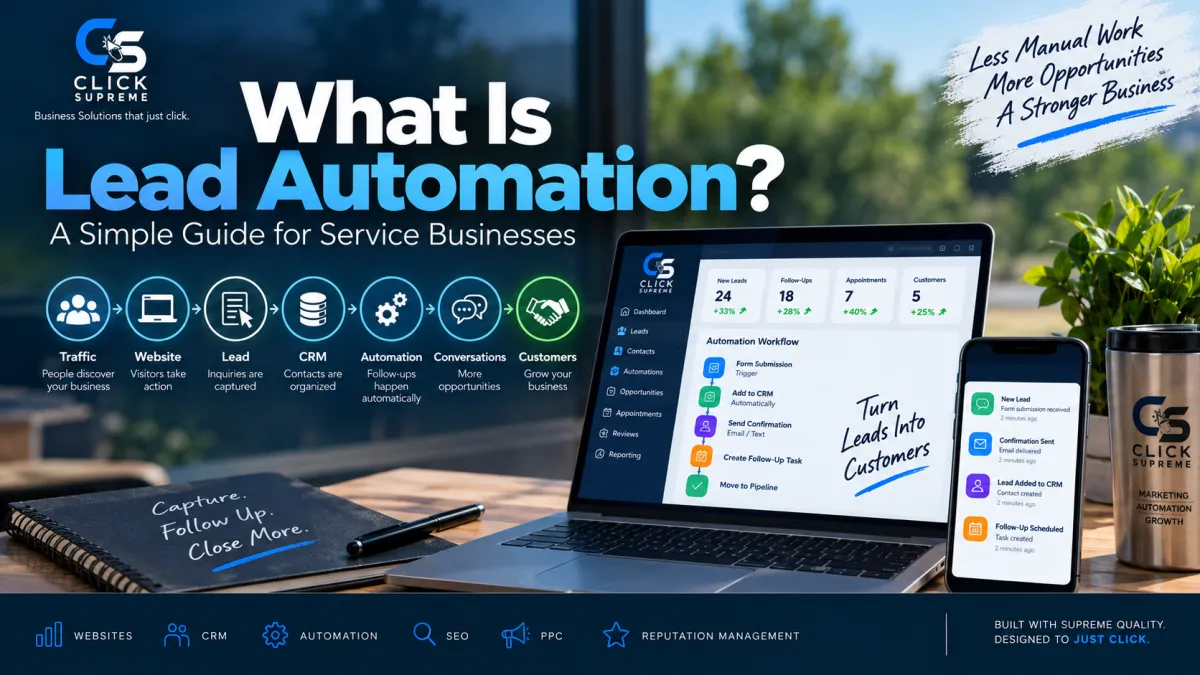
What Is Lead Automation? A Simple Guide for Service Businesses
Generating a lead is only the beginning of the sales process. Once someone fills out a form, requests a quote, calls your business, responds to an advertisement, or sends a message, the real work begins. That potential customer needs to receive a response, their information needs to be organized, and someone needs to make sure the conversation continues.
For a small service business, that process can become difficult to manage surprisingly quickly. A few inquiries may be easy to keep track of manually, but as leads begin coming from your website, Google, paid advertising, referrals, social media, and other sources, it becomes much easier for opportunities to slip through the cracks.
That is where lead automation can help.
Lead automation uses technology to handle repetitive parts of the lead management and follow-up process automatically. Instead of relying on someone to remember every email, text message, follow-up, appointment reminder, or pipeline update, businesses can build systems that help move leads through the sales process while still keeping the important human conversations personal.
What Is Lead Automation?
Lead automation is the process of using software and automated workflows to capture, organize, respond to, and follow up with potential customers.
Think about what normally happens when someone visits a service business website and requests an estimate. Someone needs to receive the inquiry, record the prospect's information, respond to the request, determine who should handle the lead, and remember to follow up if the person doesn't immediately schedule or respond.
Without a system in place, each of those steps depends on someone manually completing the next task.
Lead automation connects those steps.
For example, when someone submits a quote request through your website, their contact information can automatically enter your CRM. The prospect can immediately receive a confirmation letting them know the request was received, while someone inside the business receives a notification that a new opportunity has arrived. The lead can then be placed into the appropriate stage of the sales pipeline and additional follow-up can be scheduled if needed.
The goal isn't to remove people from the sales process. It's to make sure the repetitive administrative work doesn't prevent those conversations from happening in the first place.
How Does Lead Automation Work?
Most lead automation systems operate around triggers and actions.
A trigger is something a prospect does, such as submitting a website form, requesting a quote, calling the business, booking an appointment, replying to an email, or completing an online assessment. Once that event occurs, the system performs one or more predefined actions.
A homeowner requesting an estimate, for example, might trigger a workflow that creates a new CRM contact, records where the lead came from, sends a confirmation message, creates a sales opportunity, and alerts someone on the team.
Instead of having several disconnected tools and manual tasks, automation helps connect the different stages of the customer journey.
A simple version of that journey might look like this:
Traffic → Website → Lead Capture → CRM → Follow-Up → Sales Conversation
This becomes especially useful when a business begins generating leads from multiple marketing channels. The more opportunities coming in, the harder it becomes to manage everything through memory, spreadsheets, inboxes, and sticky notes.
Why Is Lead Automation Important for Service Businesses?
Businesses often spend most of their marketing attention on generating more leads.
They invest in SEO to improve their visibility on Google. They run PPC advertising to reach people searching for their services. They improve their website to encourage more visitors to request quotes or appointments.
Those strategies are important, but generating the lead doesn't guarantee that the opportunity becomes a customer.
Imagine spending money to generate ten new inquiries only to discover that two didn't receive a quick response, another three were contacted once but never followed up with, and one was sitting unnoticed in an email inbox.
The problem isn't necessarily lead generation anymore. It's lead management.
Lead automation helps bridge that gap. It creates a repeatable process for what happens after someone raises their hand and expresses interest in doing business with you.
This is why automation works best when it is viewed as part of the larger marketing system rather than as a standalone piece of software.
Your marketing creates attention. Your website captures the opportunity. Your CRM organizes it. Automation helps make sure the opportunity continues moving forward.
Lead Automation and CRM: How Do They Work Together?
Lead automation and customer relationship management are closely connected, but they serve different purposes.
A CRM acts as the central location for information about your leads and customers. It can store contact information, conversations, lead sources, appointments, opportunities, pipeline stages, customer history, and previous follow-up activity.
Automation helps determine what happens when something changes inside that system.
For example, your CRM might show that a prospect requested an estimate yesterday. An automation could immediately send that person a confirmation, notify a team member, create a follow-up task, and move the opportunity into the appropriate stage of your pipeline.
Another automation could recognize when a prospect hasn't responded after several days and trigger another follow-up.
The CRM organizes the relationship while automation helps keep the relationship moving.
Together, they can give service businesses a much clearer picture of where leads are coming from, what has happened with each opportunity, and what needs to happen next.
What Can You Automate in the Lead Management Process?
One of the most useful areas to automate is the initial response to a new inquiry. When someone requests information from a business, they usually want to know that their request was received. An immediate confirmation can provide that reassurance while giving the business time to respond personally.
Automation can also help with longer-term follow-up. Not every prospect is ready to buy the first time they contact a company. Some may be comparing options, waiting for the right time, or simply become busy and forget to respond.
Instead of abandoning those opportunities after one phone call or email, businesses can create a structured follow-up process that continues the conversation over time.
Automation can also be used for appointment reminders, internal notifications, lead assignments, pipeline updates, estimate follow-up, re-engaging older leads, and tracking where inquiries originated.
The important point is that not everything needs to be automated.
A good system automates the repetitive tasks where speed and consistency matter while leaving the conversations that require judgment, trust, and relationship-building to people.
How Lead Automation Connects to a Lead Generation Website
Lead automation becomes especially powerful when it connects directly to the website responsible for generating the inquiry.
A traditional business website may explain what a company does and provide a phone number or contact page. A lead generation website is intentionally designed to encourage visitors to take the next step, whether that's requesting a quote, scheduling a consultation, completing an assessment, making a phone call, or submitting a form.
Once that visitor takes action, automation can help manage what happens next.
Instead of the website being the end of the marketing process, it becomes the beginning of the follow-up process.
Someone might discover your company through Google, visit your website, request an estimate, enter your CRM, receive an immediate response, and eventually schedule a conversation with your business.
Each piece is connected to the next.
That is why we don't look at lead generation websites, CRM systems, and automation as completely separate tools. When they work together, they create a system for turning website visitors into actual sales opportunities.
How Lead Automation Supports SEO and PPC
Lead automation doesn't replace SEO or PPC advertising. It helps businesses get more value from the opportunities those channels create.
SEO can help your business become visible when potential customers search for information or services online. PPC advertising can place your company directly in front of people actively searching for what you offer.
Both strategies are designed to generate attention and traffic, but eventually that traffic needs to turn into something measurable.
When a visitor becomes a lead, automation helps connect the marketing side of the business with the sales process.
Instead of measuring success only through rankings, clicks, or website traffic, businesses can begin following the entire journey from the original marketing source to the eventual customer.
That creates a much more useful marketing system because you aren't simply asking, "How many people visited our website?"
You can start asking, "What happened after they contacted us?"
Lead Automation Doesn't Stop After the Sale
Automation can continue providing value after a prospect becomes a customer.
One example is Reputation Management.
After a service has been completed, a business can automatically begin a follow-up process requesting customer feedback or encouraging satisfied customers to share their experience through an online review.
That review can then help future prospects decide whether they trust the business enough to make contact.
This creates a cycle where one part of the marketing system strengthens another.
SEO and PPC help people discover the business. A lead generation website turns some of those visitors into inquiries. The CRM organizes those opportunities. Automation helps maintain consistent communication. Completed jobs can generate reviews, and those reviews can help the next potential customer feel more confident about choosing the company.
Instead of six disconnected marketing activities, they begin working together as one system.
What Should a Business Automate First?
Getting started with lead automation doesn't require building dozens of complicated workflows.
In fact, simpler is usually better.
Start by looking at what currently happens when someone contacts your business.
Where does their information go? How quickly does someone respond? Who is responsible for following up? What happens if the prospect doesn't answer the first call? How do you know which leads are still active? What happens after a job is completed?
Those questions often reveal where automation can provide the most immediate value.
For many service businesses, the first priority should simply be making sure every new lead enters one organized system, receives a timely acknowledgment, is assigned to the appropriate person, and has a clear follow-up process.
Once that foundation is working consistently, additional automation can be added where it makes sense.
The objective isn't to automate everything your business does. It's to remove unnecessary manual work and create a more reliable process for managing opportunities.
Lead Automation Should Still Feel Human
There is an important distinction between automating a process and automating a relationship.
Customers still want to deal with people.
A homeowner considering a major project may want to ask questions. A business owner evaluating a service may want to understand exactly what they're purchasing. A prospect comparing several companies may need a conversation before making a decision.
Automation shouldn't replace those interactions.
It should help create them.
A well-designed system makes sure a prospect receives a response, the right person knows about the opportunity, follow-up doesn't get forgotten, and useful information is available when someone needs it.
The technology handles the repetitive work in the background so the business can spend more time on the conversations that actually require a human being.
Building a Complete Lead Generation and Follow-Up System
At Click Supreme, we look at lead automation as one piece of a larger customer acquisition system.
The complete journey might look something like this:
Visibility → Traffic → Website → Lead → CRM → Follow-Up → Customer → Review
SEO and PPC can create visibility and bring potential customers to the business.
A lead generation website can turn that traffic into inquiries.
A CRM can organize those inquiries and keep customer information in one place.
Lead automation can create consistent follow-up and help opportunities continue moving through the sales process.
Reputation management can then help successful customer experiences create trust for the next person researching the business.
When those pieces work together, a business isn't simply collecting more marketing tools. It's building a system designed to capture, organize, nurture, and measure opportunities from beginning to end.
Is Lead Automation Right for Your Business?
If your business receives inquiries through website forms, phone calls, advertisements, email, social media, or other marketing channels, there is probably some part of your lead management process that could benefit from automation.
The best place to start isn't asking how much you can automate.
Instead, look for the points where potential customers are currently waiting, being forgotten, or requiring repetitive manual work.
Those are often the best opportunities to introduce automation.
A good lead automation system doesn't make a business less personal. When designed properly, it does the opposite. It handles the repetitive work behind the scenes so your team has more time to focus on the conversations and relationships that turn leads into customers.
Want to See Where Lead Automation Could Fit Into Your Business?
Click Supreme helps service businesses connect lead generation websites, CRM systems, marketing automation, SEO, PPC advertising, and reputation management into practical systems designed around the entire customer journey.
If you're not sure which part of your current marketing or follow-up process needs the most attention, our Business Growth Assessment is a good place to start.
Take the Business Growth Assessment to identify potential gaps in your current system and see where Click Supreme may be able to help.
